> For the complete documentation index, see [llms.txt](https://docs.onlymonster.ai/llms.txt). Markdown versions of documentation pages are available by appending `.md` to page URLs; this page is available as [Markdown](https://docs.onlymonster.ai/billing-and-pricing/onlymonster-referral-system.md).
# OnlyMonster Referral System
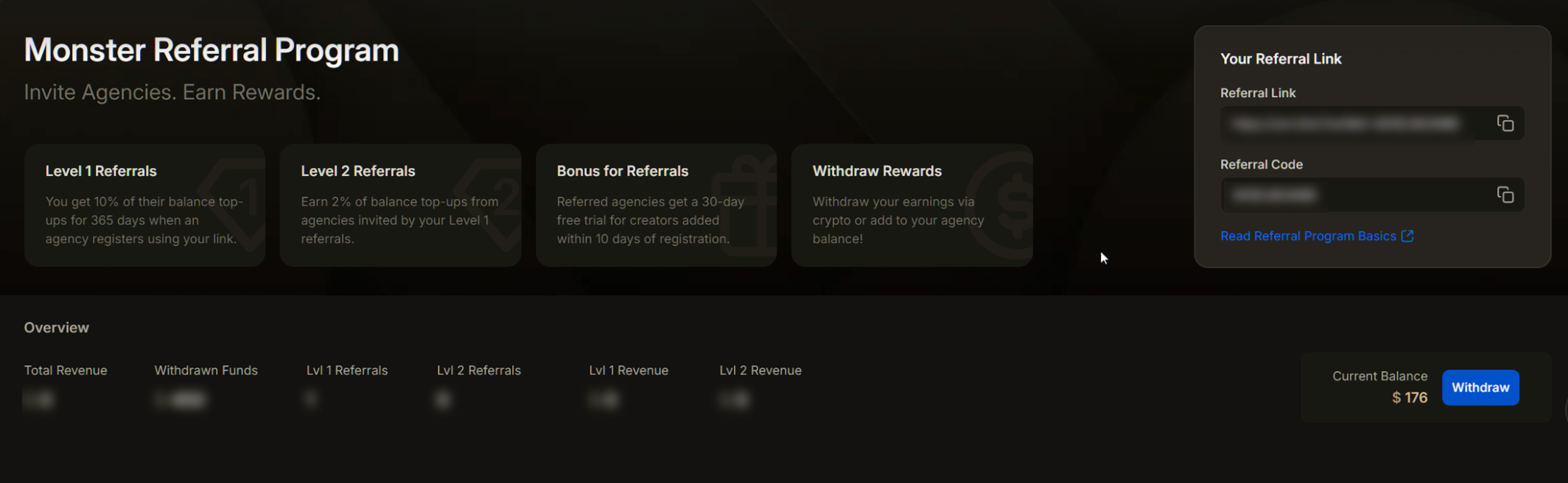
The OnlyMonster Referral System rewards you for inviting new organizations to the platform. When an organization registers using your referral link, you earn a commission, and they get an extended trial period.
## How It Works
* Every organization member has access to the referral system, no matter their role.
* Each member has a **unique referral code and link**, assigned personally to them.
* When a new organization registers using your link, they receive an extended free trial for all profiles added within 10 days of registration.
## Referral Tiers
The referral system includes two levels:
#### Level 1: Direct Referrals:
* These are organizations that register using your referral link or code.
* You receive **10% of all their balance top-ups** for the next **365 days**.
#### Level 2: Indirect Referrals:
* These are organizations invited by your **Level 1 referrals**.
* You receive **2% of their balance top-ups,** also for **365 days**.
## Fund Withdrawal
Referral rewards can be used in two ways:
1. **Transfer to Organization Balance** - Instantly move earned funds to your organization account balance and use them to pay for OnlyMonster services.
2. **Cryptocurrency Withdrawal** - Withdraw your referral earnings directly to your crypto wallet.
## Inviting Referrals
To invite an organization, you can either:
* **Copy your referral link** and share it directly
* Or send your **referral code** for manual entry
During the registration process, the invited organization must paste your referral code into the designated field.
Organizations that register using your referral link or code receive an **extended 14-day trial** for all accounts added within 10 days of registration.
## Overview Dashboard
The Overview tab in the Referral system displays key stats:
1. **Total Revenue** - Lifetime earnings from all referrals (Level 1 and 2)
2. **Withdrawn Funds** - Total funds already withdrawn (organization balance + crypto)
3. **Lvl 1 Referrals** - Number of direct (Level 1) referrals
4. **Lvl 2 Referrals** - Number of indirect (Level 2) referrals
5. **Lvl 1 Revenue** - Earnings from Level 1 referrals
6. **Lvl 2 Revenue** - Earnings from Level 2 referrals
7. **Current Balance** - Referral earnings available for withdrawal
8. **Withdraw Button** - Click to access withdrawal options
## Balance Withdrawal
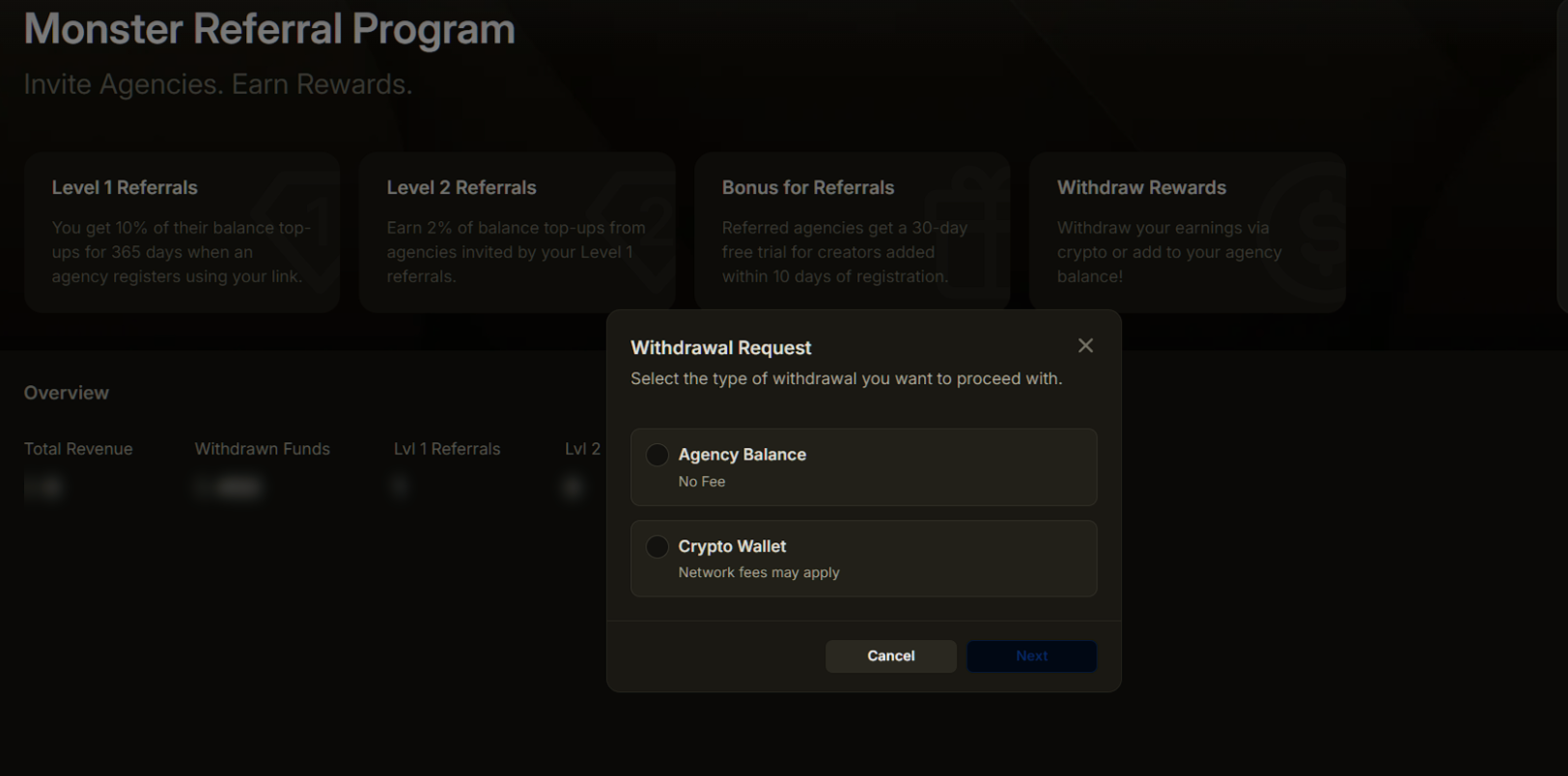
To withdraw your referral earnings, click the **Withdraw** button in the Overview tab. A popup window will appear with two options:
* **Transfer to Organization Balance**
* **Withdraw to Crypto Wallet**
#### Withdrawal to Organization Balance
Withdrawal to your organization account is processed without any fees. The minimum withdrawal amount is $100.
To withdraw funds:
1. Enter the amount in the input field (or click "Max" to withdraw your full balance)
2. Click **Submit**
Your request will be marked as **Pending** and sent for review. After approval, the funds will be credited to your **Organization Balance.**
Once processed, the transaction will appear in your Billing History and be reflected in your organization balance.
If your request is stuck in “Pending” or gets canceled, contact our support team for clarification.
#### Withdrawal to Crypto Wallet
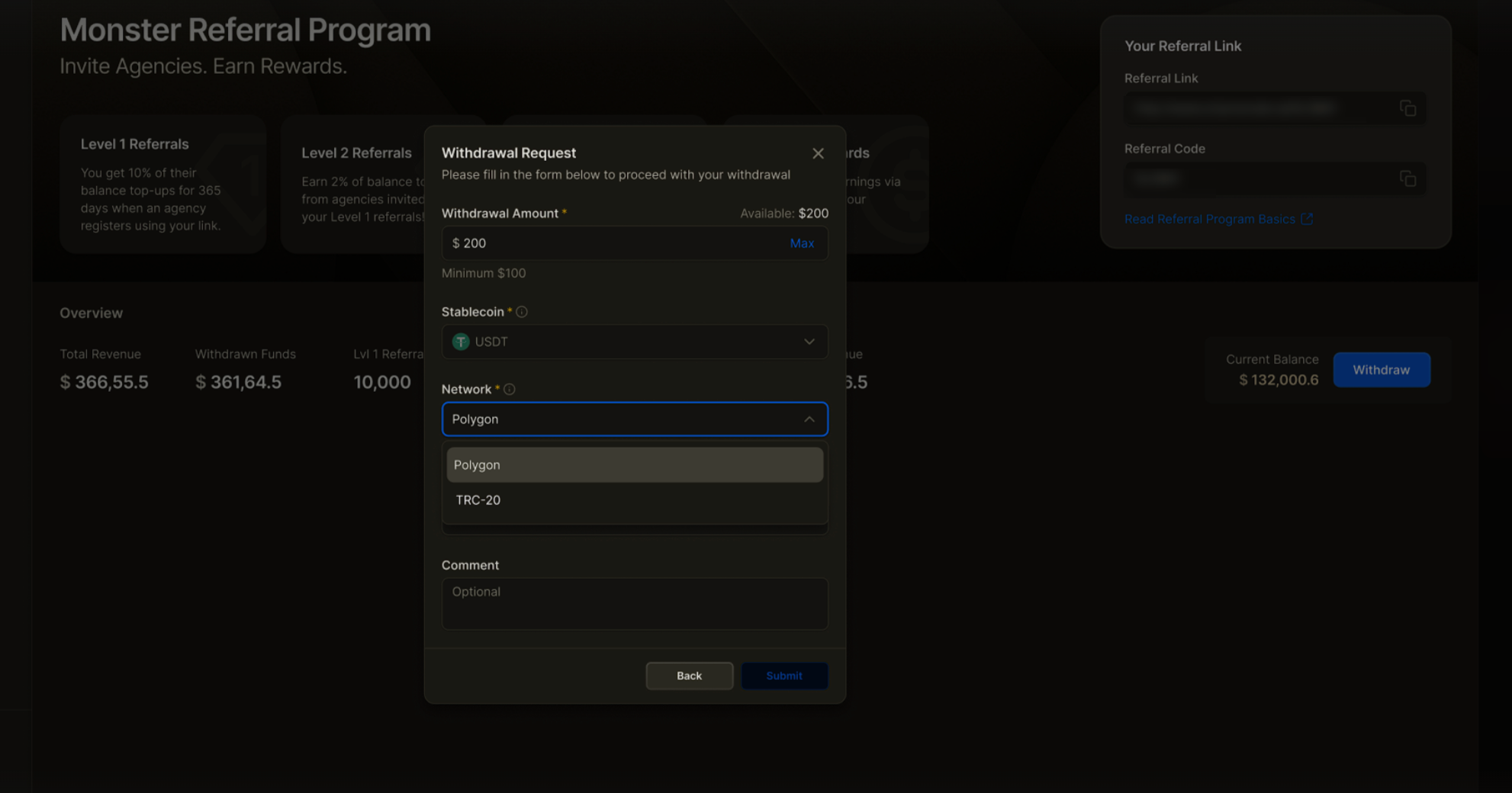
To withdraw funds to your crypto wallet, click the **Withdraw** button and select crypto wallet withdrawal. We do not charge any fees for this operation, however network fees may apply.
To complete the withdrawal:
1. Enter the exact withdrawal amount (minimum $100)
2. Choose a stablecoin: USDT or USDC
3. Choose the appropriate network from the dropdown menu
4. Enter your wallet address
5. Add comments if necessary
6. Click **Submit**
Funds are usually transferred within 2-3 business days.
For changes, corrections, or delayed transactions, please contact our support team.
## Anti-Abuse Policy
OnlyMonster actively monitors the Referral System to prevent fraudulent activity, including but not limited to:
* Creating multiple accounts for self-referral
* Registering fake or duplicate organizations
* Any attempt to manipulate referral rewards or commissions
#### Policy Enforcement
If abuse is detected:
* The referral code will be suspended
* All earned commissions will be forfeited
* Any pending or future withdrawal requests will be blocked
These actions are final and applied to protect the integrity of the referral program.
#### Acceptable Use
We encourage genuine referrals that bring real value to legitimate organizations and users.
If you are unsure whether a specific referral practice is allowed, please contact OnlyMonster Support before proceeding.
---
# Agent Instructions
This documentation is published with GitBook. GitBook is the documentation platform designed so that both humans and AI agents can read, navigate, and reason over technical content effectively. Learn more at gitbook.com.
## Querying This Documentation
If you need additional information that is not directly available in this page, you can query the documentation dynamically by asking a question.
Perform an HTTP GET request on the current page URL with the `ask` query parameter, and the optional `goal` query parameter:
```
GET https://docs.onlymonster.ai/billing-and-pricing/onlymonster-referral-system.md?ask=&goal=
```
`ask` is the immediate question: it should be specific, self-contained, and written in natural language.
`goal` is optional and describes the broader end goal you are ultimately trying to accomplish on behalf of the user. GitBook uses it to tailor the answer towards what is most useful for that goal.
The response will contain a direct answer to the question and relevant excerpts and sources from the documentation.
Use this mechanism when the answer is not explicitly present in the current page, you need clarification or additional context, or you want to retrieve related documentation sections.