> For the complete documentation index, see [llms.txt](https://docs.onlymonster.ai/llms.txt). Markdown versions of documentation pages are available by appending `.md` to page URLs; this page is available as [Markdown](https://docs.onlymonster.ai/management-system/link-overview.md).
# Link Overview
The Link Overview section provides granular, link-level performance analytics for both Trial and Tracking Links. It gives managers full visibility into fan activity and earnings attribution across the entire lifetime of each link.
## Overview
Link Overview is a dedicated analytics view for individual traffic links.
From the Traffic Metrics dashboard, you can:
1. Hover over a link.
2. Click the redirect button.
3. Open a new window with detailed performance metrics and fan-level data for the selected link.
All metrics in Link Overview are calculated using the All Time range.\
All earnings use double attribution, ensuring complete visibility into revenue generated through each link.
### Key Metrics
**Earnings**
**Total Earnings** — Total revenue generated from all fans acquired through this link.
**Acquisition Metrics**
**Total Clicks** — Total number of clicks recorded for the link.
**Total Fans Collected** — Total number of fans tracked by OnlyMonster for this link.
**Total Fans on OnlyFans** — Number of fans acquired through the link:
* **Tracking Links: subscribers**
* **Trial Links: trial claims**
**Reply Rate** — The percentage of fans on a link who replied to at least one message from the account. Calculated across all fans on the link (*from the Reply Rate release date — Apr 28*).
**Total Spenders** — Number of fans who completed at least one purchase.
**Total Purchases** — Total number of transactions made by fans acquired through this link. Chargebacks are not included in this metric.
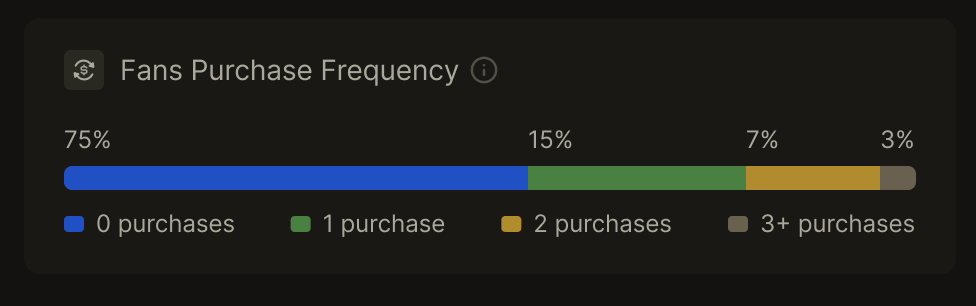
### Fan Purchase Frequency
The system displays purchase behavior distribution for fans acquired through the link:
* **0 Purchases** — Percentage of fans who made no purchases
* **1 Purchase** — Percentage of fans who made exactly one purchase
* **2 Purchases** — Percentage of fans who made exactly two purchases
* **3+ Purchases** — Percentage of fans who made three or more purchases
Data is updated according to the campaign (link) sync interval.
## Link Overview Table
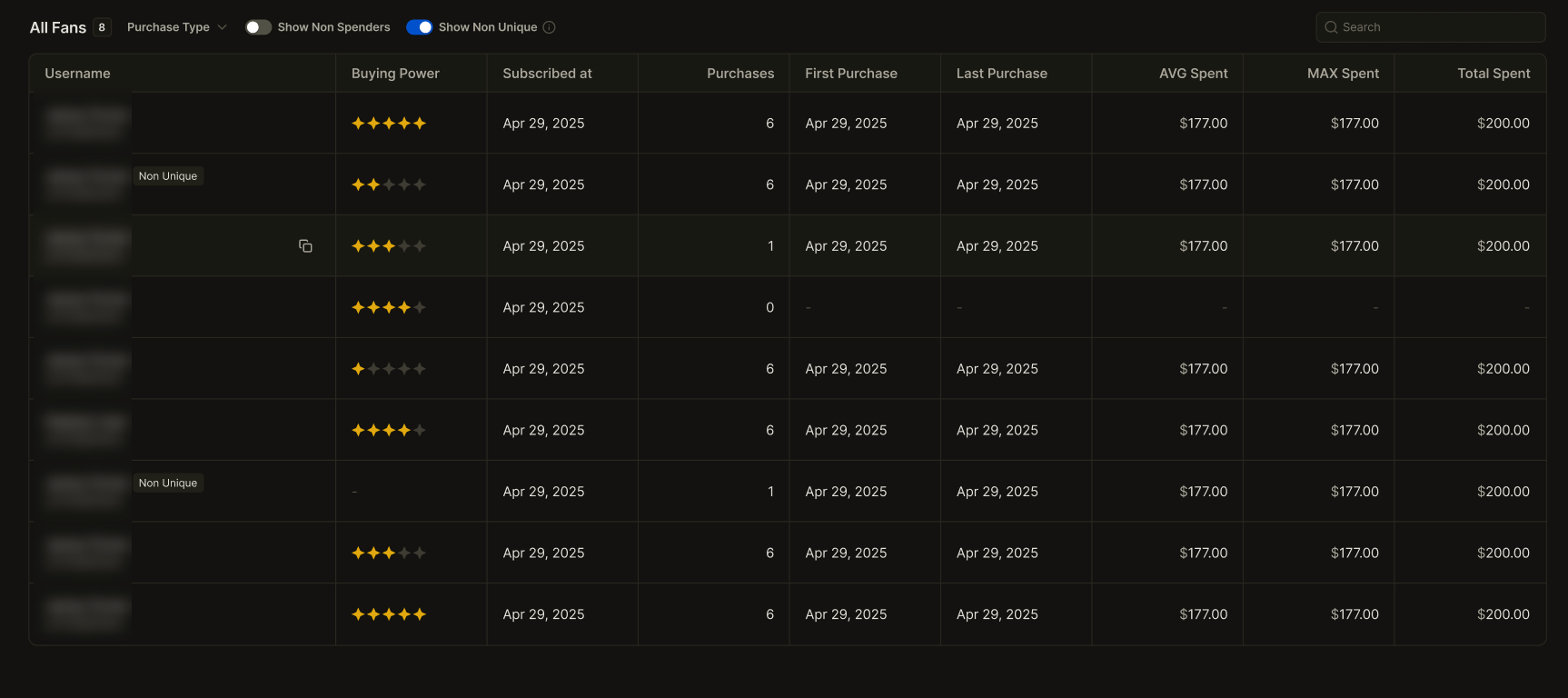
The Link Overview table lists all fans acquired through the selected link. It provides detailed fan-level analytics and purchase behavior insights.
### Filtering Options
### **Purchase Type Filter**
Select which transaction types to include in the report. By default, all transaction types are selected.
* Subscription
* Recurring Subscription
* Tips
* Posts
* Messages
* Streams
### **Non-Spenders Toggle**
Controls whether fans with no purchases appear in the table. This toggle is disabled by default.
### **Non-Unique Fans Toggle**
Fans who previously subscribed through other links are marked as non-unique.
* **Toggle on** — show non-unique fans
* **Toggle off** — hide non-unique fans
This toggle is enabled by default.
### Table Columns
**Username** — Displays both the fan's name and username.
**Buying Power** — Shows the buying power level for each fan in the table.
**Subscribed At** — Date when the fan subscribed.
**Replied** — a **Reply Rate** status:
* **Yes** — the fan replied to a message
* **No** — a message from the account was sent, but no reply yet
* "-" — no messages either way
**Unique Fan** — Indicates whether this is the fan's first subscription to the selected account.
**Purchases** — Total number of purchases made by the fan.
**First Purchase** — Date of the fan's first purchase.
**Last Purchase** — Date of the fan's most recent purchase.
**AVG Spent** — Average amount spent by the fan through the link.
**Max Spent** — Maximum single transaction amount from the fan.
**Total Spent** — Cumulative spending by the fan through the link.
You can copy the link to any fan's page by clicking the Copy button.
### Export Availability
Exporting Link Overview reports is not yet available.\
This feature will be added in a future update.
### Access Requirements
Access to Link Overview requires the View Traffic Metrics permission.
---
# Agent Instructions
This documentation is published with GitBook. GitBook is the documentation platform designed so that both humans and AI agents can read, navigate, and reason over technical content effectively. Learn more at gitbook.com.
## Querying This Documentation
If you need additional information that is not directly available in this page, you can query the documentation by asking a question.
Perform an HTTP GET request on the following URL with the `ask` and `goal` query parameters:
```
GET https://docs.onlymonster.ai/management-system/link-overview.md?ask=&goal=
```
`ask` is the immediate question: it should be specific, self-contained, and written in natural language.
`goal` is what the user is ultimately trying to achieve, the reason they need the answer. Sharing it helps GitBook give you a better, more relevant answer. A goal is most helpful when it describes the outcome the user wants rather than restating the question. For example, with `ask=how do I create an API token`, a goal like `automate deployments from our CI pipeline` lets GitBook tailor the answer to that use case.
The response will contain a direct answer to the question and relevant excerpts and sources from the documentation.
Use this mechanism when the answer is not explicitly present in the current page, you need clarification or additional context, or you want to retrieve related documentation sections.