> For the complete documentation index, see [llms.txt](https://docs.onlymonster.ai/llms.txt). Markdown versions of documentation pages are available by appending `.md` to page URLs; this page is available as [Markdown](https://docs.onlymonster.ai/ai-magic-assistant/translation-rules-glossary.md).
# Translation Rules (Glossary)
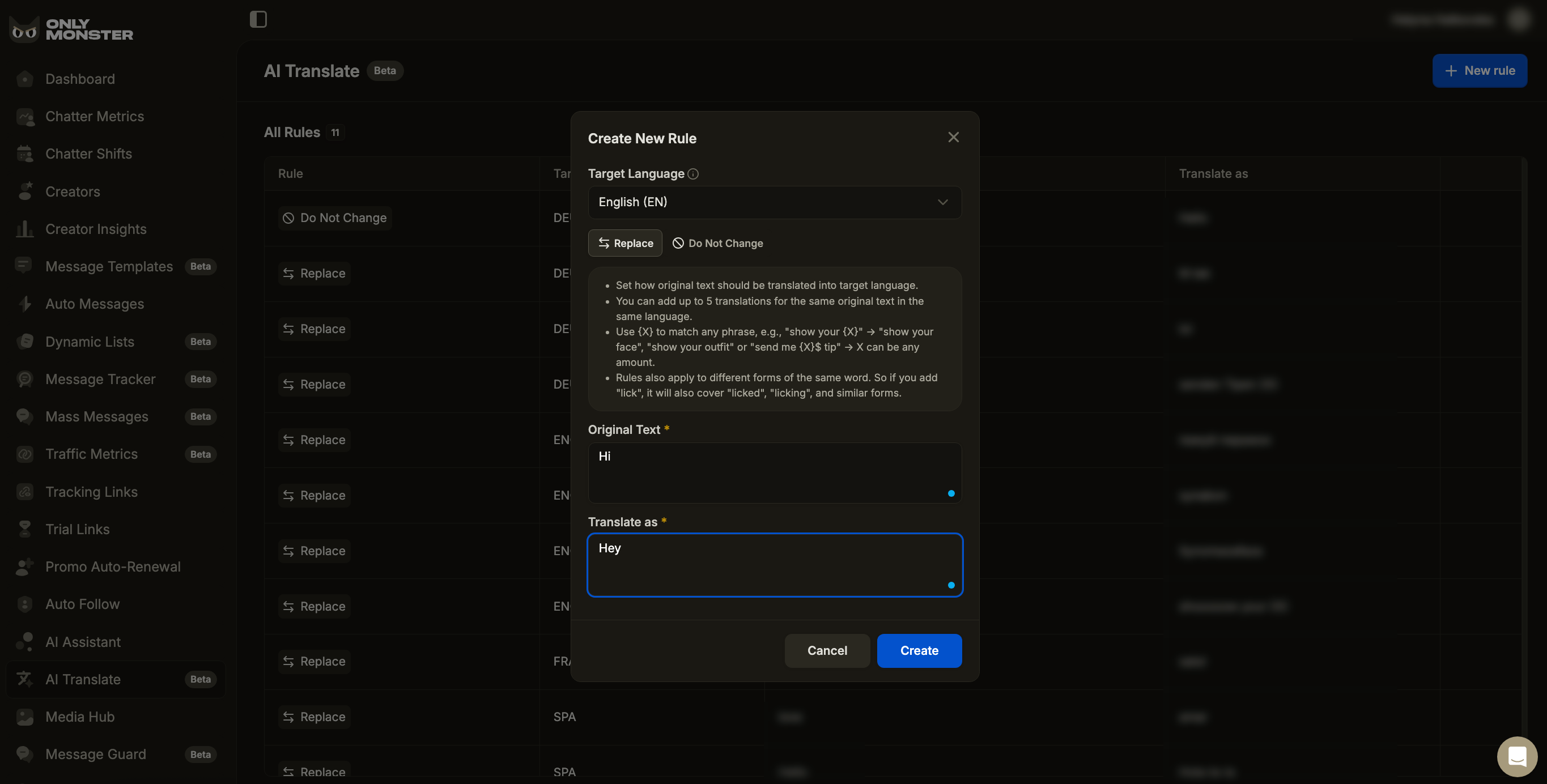
The OnlyMonster AI Translate Glossary gives you complete control over translation behavior. You can choose to always replace certain terms with specific translations or keep terms unchanged when translating. This is particularly useful for brand names, slang, product abbreviations like PPV, proper names, and industry-specific terminology.
You can add single words or full phrases to your glossary.
{% hint style="info" %}
The Glossary is currently available for all Native Translator pairs. It only works when using Native mode in the AI Translator. If the Default mode is selected, glossary rules will not be applied.
{% endhint %}
### Native Translator pairs:
German → English
English → German
English → Spanish
English → French
German → French
Russian → English
Ukrainian → English
### Accessing the Glossary
The AI Translate Glossary is available in the AI Translate tab in your OnlyMonster dashboard.
### Rule Types
The glossary supports two types of translation rules.
#### Do Not Change
Use this rule when a word or phrase must remain exactly the same after translation.
Typical use cases:
* Names and nicknames
* Brand or platform names
* Slang that should not be translated
The text will be kept unchanged wherever it appears in the message.
Example:
* Original: OnlyFans → Result: OnlyFans
* Original language: "I post daily on OnlyFans"
* Target language: "Je poste tous les jours sur OnlyFans"
#### Replace
Use this rule when a specific word or phrase should always be translated in a specific way. The system enforces your provided translation while generating the rest of the sentence naturally.
Example:
* Original: tip → Translate as: Trinkgeld
* Original language: "Thanks for the tip, you're so sweet"
* Target language: "Danke für das Trinkgeld, du bist so süß"
### Rule Behavior
* Maximum length: up to 150 characters per rule
* Not case-sensitive: rules apply regardless of letter casing (e.g., "Daddy" and "daddy" are treated the same)
* Word boundaries: single-word rules do not trigger inside other words
* Punctuation tolerant: punctuation around a phrase does not block matching
* Word forms included: rules also apply to related word forms. For example, if you add "lick", it can also cover "licked", "licking", and similar forms
* Target language specific: rules apply only to the selected target language
### Variables
{X} can be used as a placeholder for dynamic values like prices, names, amounts, or other variable content.
Example:
If you define {X} as a specific value (like 20$), then in all translation cases, {X} will be replaced with that value
* Original Text: "I’d take {X} as a tip for that"
* Translate as: "Würde dafür {X} als Trinkgeld nehmen"
### Creating a Rule
1. Open the AI Translator tab.
2. Click Create New Rule.
3. Select the Target Language.
4. Choose your rule type: Replace or Do Not Change.
5. Enter the Original Text (English or French).
6. If using Replace, enter the translation in the Translate As field.
7. Click Save.
### Managing Your Rules
#### Overview and Editing
In the main overview, you can see all your existing rules. The table displays:
* Rule Type - Replace or Do Not Change
* Target Language - The language the rule applies to
* Original Text - The term or phrase being monitored
* Translate As - The replacement text (for Replace rules)
* Actions - Delete option
To delete a rule, hover over the row and click the Delete button in the Actions column.
### Permissions
Editing the glossary requires the AI Translator permission. Users without this permission can not create or delete glossary rules.
\
---
# Agent Instructions
This documentation is published with GitBook. GitBook is the documentation platform designed so that both humans and AI agents can read, navigate, and reason over technical content effectively. Learn more at gitbook.com.
## Querying This Documentation
If you need additional information that is not directly available in this page, you can query the documentation dynamically by asking a question.
Perform an HTTP GET request on the current page URL with the `ask` query parameter, and the optional `goal` query parameter:
```
GET https://docs.onlymonster.ai/ai-magic-assistant/translation-rules-glossary.md?ask=&goal=
```
`ask` is the immediate question: it should be specific, self-contained, and written in natural language.
`goal` is optional and describes the broader end goal you are ultimately trying to accomplish on behalf of the user. GitBook uses it to tailor the answer towards what is most useful for that goal.
The response will contain a direct answer to the question and relevant excerpts and sources from the documentation.
Use this mechanism when the answer is not explicitly present in the current page, you need clarification or additional context, or you want to retrieve related documentation sections.